
Why most Shopify carts lose 7 out of 10 shoppers between Add to Cart and Place Order — and the diagnostic walk-through to find your specific leak in under 30 minutes.
Open your Shopify analytics. Look at two numbers side by side: how many Add to Carts you got last month, and how many Orders. If the second number is less than a third of the first, you’re sitting on what we call the silent revenue killer: a Shopify cart abandonment problem that’s quietly costing you more than your ad spend.
So here’s the uncomfortable benchmark: the global average Shopify cart abandonment rate is around 70%. That’s not us being dramatic — it’s Baymard Institute’s number, reconfirmed across years of ecommerce research. Seven out of ten people who added a product to your cart left without paying. Most of them aren’t coming back.
The good news is the same as the bad news: this is one of the most diagnosable leaks in ecommerce. There aren’t a hundred reasons people abandon carts. There are about six — and the data on which ones cause the most damage is unusually consistent across stores, industries, and price points.
What follows is the six-leak diagnostic we run on every cart abandonment audit. Each one takes about five minutes to check on your own store. By the end, you’ll know which leak is yours and roughly how much it’s costing you.
(If you’re new to the leak-finding diagnostic, start with our broader walk-through here — this article goes deep on the cart-specific leaks that the broader piece only touches.)
First, what your Shopify cart abandonment rate actually means
Before we hunt for leaks, get the number itself clear.
Shopify cart abandonment rate = the percentage of shoppers who add a product to their cart but don’t complete the purchase. The formula is:
(1 − Completed Purchases ÷ Carts Created) × 100
You can pull both numbers from Shopify directly: Analytics → Reports → Online store conversion over time. The conversion funnel breakdown shows you the drop-off at each stage: Sessions → Added to Cart → Reached Checkout → Sessions Converted.
The benchmarks worth knowing:
- Average across all ecommerce: ~70% cart abandonment (Baymard Institute, 2024)
- Healthy Shopify store: 60-65%
- Top decile: under 55%
- Concerning: 80%+
If you’re at 80% or higher, you almost certainly have one of the six leaks below — and you’re losing meaningful revenue every day it goes unfixed. A store with 1,000 carts a month at an $80 average order value is leaving roughly $24,000 a month on the table when abandonment is 10 percentage points above where it should be.
That’s the size of the problem. Now let’s find which leak is yours.
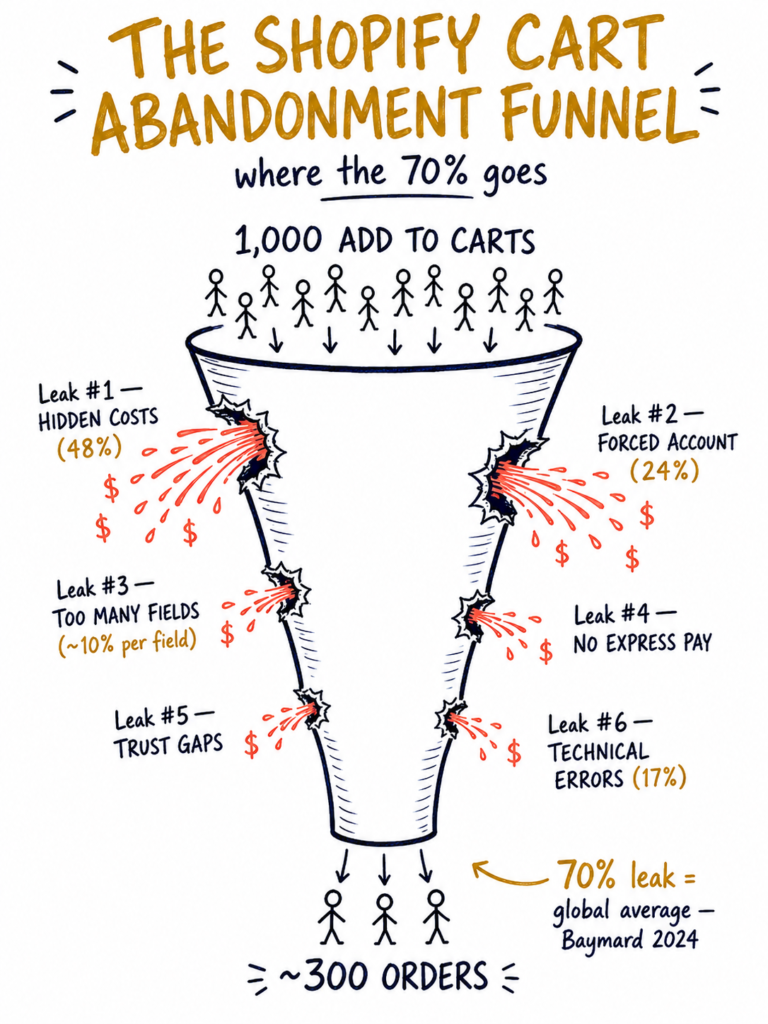
Show Image The default state of a Shopify cart: 1,000 in, 300 out. The leak is hiding somewhere in the middle.
Leak #1 — Hidden costs revealed at the wrong moment
This is, by an enormous margin, the biggest single cause of Shopify cart abandonment. Baymard’s research puts it at 48% of all abandonments. Almost half.
What happens: a shopper sees a product at $50. They add it to the cart, mentally committed to spending $50. They click through to checkout. The page reveals: shipping $15, tax $5, total $70. That’s a 40% jump from the price they mentally locked in. They feel ambushed. They close the tab.
The mental model that matters: customers anchor on the price they first saw. Anything that increases the total after that anchor feels like a betrayal, not a fee. It doesn’t matter if your shipping is genuinely reasonable — what matters is whether they were prepared for it.
How to test, in five minutes:
- Open your store on a private/incognito browser tab (so you’re not logged in)
- Add a product to the cart
- Note the price you see in the cart
- Click through to checkout and note the total
- Calculate the gap as a percentage
If the gap is over 15%, you have this leak. If it’s over 25%, it’s almost certainly your biggest leak.
The fixes, in order of effectiveness:
- Show shipping cost in the cart drawer, not just at checkout. Even a “Shipping calculated at checkout, typically $8-$15” line removes the surprise.
- Offer a free-shipping threshold ($75-$100 is the sweet spot for most stores). Then surface it in the cart: “Add $14 more to your cart for free shipping.” This both eliminates the surprise AND lifts your average order value.
- Build shipping into the product price if your margins allow. Many high-converting Shopify stores show “free shipping” as a default — they just priced it in. Mental anchor is set correctly from the start.
Leak #2 — Mandatory account creation
This is the second-most-cited reason for cart abandonment. Baymard puts it at 24% of all abandons. Almost a quarter of customers will quit the second you ask them to make an account.
The psychology: first-time buyers don’t yet trust you enough to invest in a relationship. They want to buy a thing and move on. Asking them to create an account before they’ve even paid you signals “we want your data” — which feels like a tax, not a service.
How to check, in two minutes:
In Shopify admin → Settings → Customer accounts, see what option you have selected:
- Disabled — guest checkout only (safest for conversion)
- Optional — customers can choose to create an account or check out as guest (good)
- Required — they must create an account to buy (this is the leak)
If you’ve got Required selected, that alone is potentially shaving 20-25% off your conversion rate.
The fix: switch to Optional. You can still collect their email at checkout for marketing purposes — Shopify does that by default. You just don’t gate the purchase behind account creation.
Leak #3 — Too many form fields
Every form field you ask a customer to fill out costs you conversion. Research from the Baymard Institute and Shopify’s own checkout team puts the drop-off at roughly 8-10% per unnecessary field.
A 10-field checkout converts about 15-20% lower than a 5-field checkout for the same product, same price, same audience. That’s a leak you’re inflicting on yourself for no business reason.
How to count, in five minutes:
- Walk through your own checkout (incognito tab again)
- Count every field on every page from cart to confirmation
- Mark each one as: legally required, operationally required, or nice-to-have
Common nice-to-haves that are silently killing your conversion:
- Phone number — only needed if you’re using SMS shipping notifications or specific couriers require it. Otherwise, drop it or make it optional.
- Date of birth — almost never legitimately required. Drop it.
- “How did you hear about us?” — interesting marketing data, terrible at checkout. Move it to a post-purchase survey.
- Marketing opt-in checkboxes pre-ticked — not just bad for conversion, also non-compliant with Australian Privacy Principles and most modern privacy laws. Make them un-ticked.
- “Create account” prompts during checkout — covered in Leak #2.
The principle: if it’s not legally required and isn’t operationally necessary, get rid of it. You can always ask for more information after the purchase, when they trust you.
Leak #4 — Missing express payment options
The half of your traffic that’s on mobile (in most stores, that’s 70-85% of all visitors) doesn’t want to type out credit card details on a phone. They want to tap once and be done.
When Apple Pay, Shop Pay, Google Pay, and Afterpay/Klarna are all present and prominent, mobile conversion lifts by 20-40% on average. When they’re missing or buried below the standard card form, you’re losing the impatient majority — which on mobile is most of your audience.
The Shop Pay bonus: Shopify gives this to you free. It’s their own express checkout. Once a customer has used Shop Pay anywhere in the Shopify ecosystem, their details are saved. Your store gets the benefit of every other Shopify store’s onboarding work. Shopify’s own data shows Shop Pay checkout converts 1.72x higher than standard checkout — a near-doubling, just from one toggle.
How to enable, in three minutes:
- Shopify admin → Settings → Payments
- Under “Shopify Payments,” check that Shop Pay is enabled
- Under “Wallets,” enable Apple Pay, Google Pay, and any Buy-Now-Pay-Later options relevant to your audience (Afterpay and Klarna are the big ones in Australia)
- Go to Settings → Checkout and ensure the express payment row appears above the standard card form, not below
If you skip step 4, the express options exist but customers have to scroll past the card form to find them. Half won’t bother.
Leak #5 — Trust gaps at the moment of payment
Trust is a different problem at the cart than it is on the product page. On a product page, the customer is asking: “is this thing good?” At the cart, they’re asking: “is it safe to give these people my money?”
These are different doubts, and they need different signals. Yet most Shopify stores spend all their trust-building on the product page and the cart drawer goes naked.
What’s usually missing in a cart or checkout that creates this leak:
- No visible secure-checkout indicator. A small “Secure SSL checkout” badge or padlock icon near the payment field calms last-second doubts.
- No money-back guarantee mention. A one-line “30-day money-back guarantee” near the place-order button can move the needle measurably — customers reframe the purchase from “what if I hate it?” to “what if I love it?”
- No visible returns policy link. Many shoppers will leave the cart, search “[your brand] returns policy” on Google, get distracted, and never come back. Put a link to the policy in the cart, not buried in the footer.
- No social proof at the moment of payment. “Join 12,000 happy customers” or a quick star rating near the place-order button reduces last-mile anxiety.
Five-minute test: open your own cart and ask yourself, “if I’d never heard of this brand, would I trust it with my card right now?” If the answer hesitates, you have a trust leak in the cart.
Leak #6 — Technical errors and slow checkout
This is the leak that founders most underestimate. Baymard puts website errors and crashes at 17% of all cart abandons — meaning roughly one in six abandonments is caused by something that’s genuinely broken, not by the customer’s lack of intent.
Common technical-error patterns we find on audits:
- The discount code box that “doesn’t recognise” valid codes, usually because the code expired or got disabled without anyone noticing
- Address validation that rejects valid Australian addresses (especially for regional or rural addresses) — this one happens silently and customers just leave
- Slow checkout page load (over 3 seconds on mobile) caused by heavy theme code or unoptimised images
- Saved payment methods that fail silently, particularly Shop Pay or Apple Pay when the customer’s session token has expired
- Tax calculation errors at the final step, particularly for international customers
How to find them, in fifteen minutes:
- Run your checkout URL through pagespeed.web.dev — anything over 3 seconds Largest Contentful Paint needs work
- Test every active discount code yourself (incognito, fresh cart) — at least once a month
- Use Microsoft Clarity or Hotjar to watch 10 session recordings of customers who abandoned at the checkout stage — look for rage clicks, repeated form-field interactions, or sudden tab closures
- Have a friend in a regional area try to check out and see if their address validates
This is the leak that costs you sales you’d otherwise definitely have closed. Customers wanting to buy and being prevented by a broken cart is the most expensive failure mode in ecommerce.
Show Image The diagnostic decision tree. Most stores find their answer in step 1 or 2.
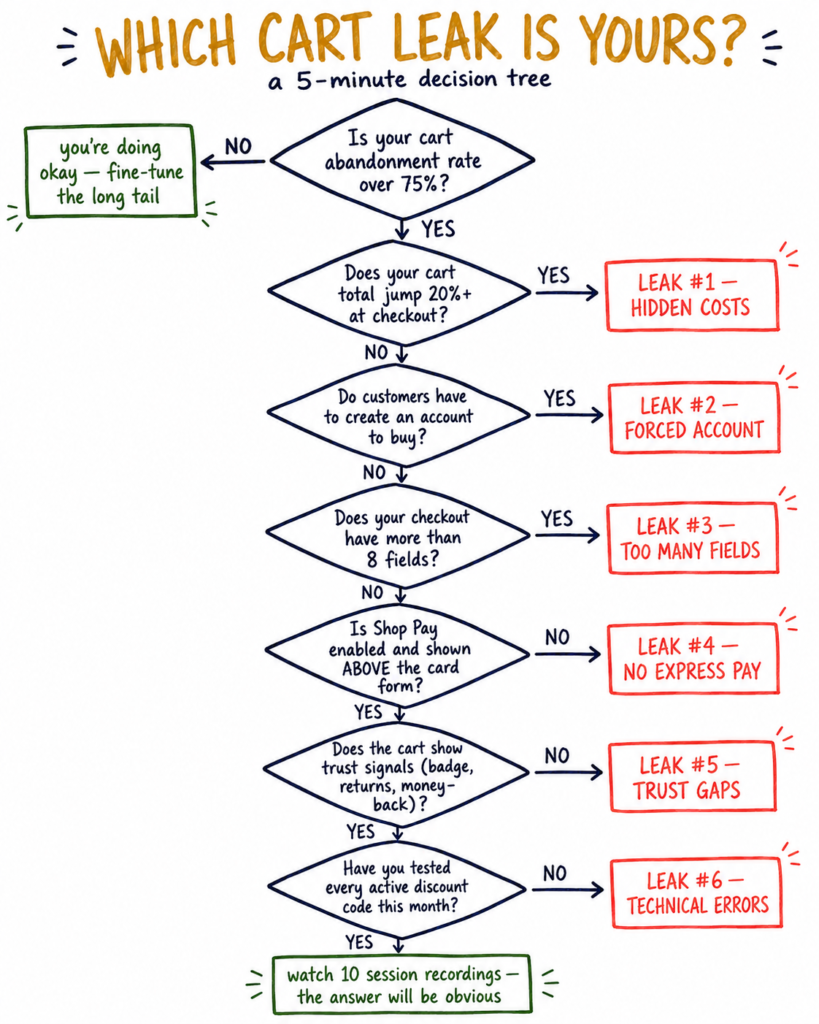
How to know which leak is actually yours (without guessing)
Six leaks is too many to “fix all at once.” You need to identify the specific one costing you most, then fix that one first.
The 30-minute method:
- Open Microsoft Clarity (it’s free) or Hotjar (free tier available) and install it on your Shopify store — takes 5 minutes. Wait 48 hours for data to accumulate.
- Filter to sessions where the customer reached the cart but didn’t complete a purchase. Both tools let you create this segment.
- Watch 10 of those session recordings. Yes, all 10. Watch what they do. Watch where they pause. Watch what they click and what they don’t.
- Note the consistent pattern. If 8 out of 10 sessions show the customer reading the shipping cost line, scrolling back up, and closing the tab — you’ve found Leak #1. If 7 of 10 show them rage-clicking on a broken discount code — you’ve found Leak #6.
The pattern will be obvious once you’ve watched the recordings. Most founders never do this single 30-minute exercise, which is why the leak stays invisible for months.
The recovery layer: don’t let abandoned carts walk away forever
Even after you fix the leaks above, some abandonment is unavoidable. People get distracted. Babies cry. Boss walks past. Battery dies. Industry data suggests well-designed cart abandonment recovery emails recover 10-15% of abandoned carts — which on a $50,000-per-month store is $5,000-$7,500 in additional revenue with almost zero ongoing cost.
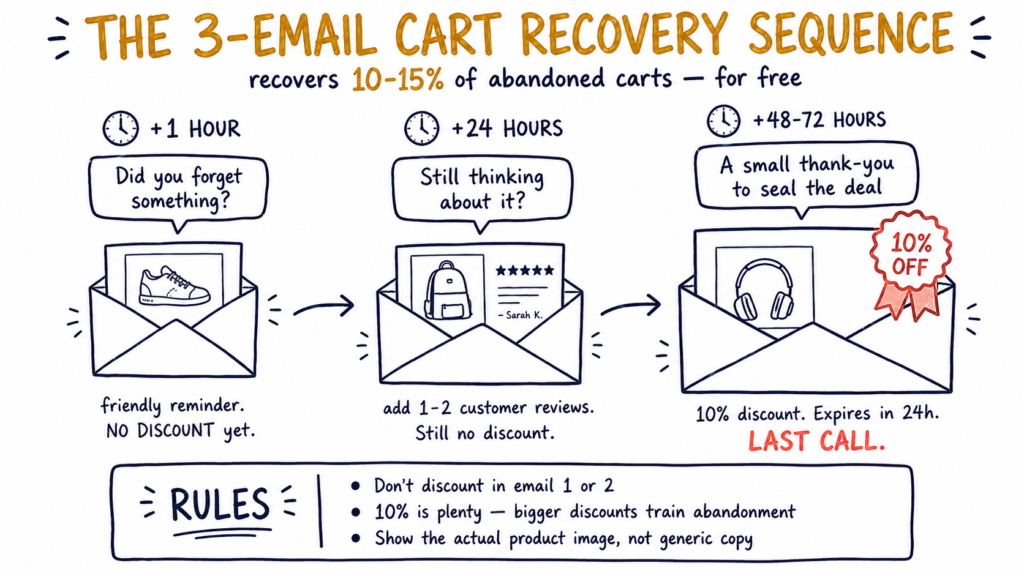
The basic three-email recovery sequence that works for most Shopify stores:
Email 1 — Sent 1 hour after abandonment. Subject: “Did you forget something?” or “Your cart is still here.” Tone: friendly, no urgency, just a reminder. Show the actual product image and a one-click “complete checkout” link.
Email 2 — Sent 24 hours after abandonment. Subject: “Still thinking about it?” or “Don’t miss out — [product] is selling fast.” Tone: address common objections. Include one or two customer reviews near the product image. Still no discount yet.
Email 3 — Sent 48-72 hours after abandonment. Subject: “A small thank-you to seal the deal.” Tone: include a 10% discount code with a 24-hour expiry. Last call. Don’t over-discount — 10% is enough; bigger discounts train your customers to abandon for the reward.
Tools to set this up: Shopify’s built-in cart abandonment emails are free and reasonable for a basic sequence. For more sophisticated recovery — segmentation, SMS, dynamic content — Klaviyo or MailerLite are the standard upgrades.
One thing worth flagging: cart abandonment recovery is a bandage, not a cure. Always fix the leaks above first. Recovery emails can’t save you from a fundamentally broken checkout.
Show Image The three-email recovery sequence. Free to set up, recovers 10-15% of carts on average.
Why fixing Shopify cart abandonment compounds harder than almost any other lever
Most ecommerce levers are linear. Spend more on ads, get more clicks. Increase conversion rate by 1%, get 1% more revenue.
Cart abandonment is different — fixing it compounds for free across every single visitor who arrives, forever. A one-time fix to your shipping reveal (Leak #1) keeps recovering revenue for months and years without you touching it again. You pay the fix cost once. You collect the revenue continuously.
The math gets striking quickly. Take a store with:
- 2,000 add-to-carts per month
- $80 average order value
- 75% cart abandonment (worse than average)
- That’s 500 orders × $80 = $40,000/month in actual revenue
Now imagine you fix Leak #1 and reduce abandonment to 65% (still above the top decile, but better):
- 2,000 ATCs × 35% conversion = 700 orders × $80 = $56,000/month
That’s a $16,000-per-month uplift — $192,000 a year — from a single afternoon fixing one leak. No additional ad spend, no new traffic, no new products. Just plugging a hole that was already costing you money.
This is why we always start audits with the cart, not the ads.
The global average is around 70%. A healthy Shopify store sits at 60-65%. Anything under 55% puts you in the top decile. So if you’re above 75%, you almost certainly have one of the six leaks above — usually hidden costs (Leak #1) or mandatory account creation (Leak #2). Below that, focus on the friction leaks first.
Yes. Shopify admin → Orders → Abandoned checkouts shows you the email, items, and value of every cart that was created but not completed. You can manually send them a recovery email from this page, or set up automated sequences in Shopify, Klaviyo, or MailerLite. The most valuable use is honestly to watch the patterns — if 80% of abandons have the same item or hit the same price threshold, that tells you exactly where the leak is.
Shopify gives you a basic version free: Settings → Notifications → Abandoned checkout. Customise the email content, choose how long after abandonment it sends (default is 10 hours; we recommend the three-email sequence above). For more advanced sequences — multiple emails, branching logic, SMS — Klaviyo and MailerLite are the standard tools, and both integrate with Shopify in two clicks.
Sometimes. The general rule: don’t discount in your first recovery email. Discount in your last (typically Email 3, sent 48-72 hours later) if at all. The danger of over-discounting: you train customers to abandon their cart deliberately, because they’ve learned that doing so triggers a discount. Reserve the discount for shoppers who genuinely needed the extra nudge, not for everyone who paused.
Yes, considerably. Fashion and apparel tend to have higher abandonment (around 70-75%) because customers price-compare aggressively. Beauty and skincare sit closer to average (65-70%). High-consideration purchases — furniture, electronics over $500 — can hit 85% abandonment, which is normal because customers research over multiple sessions. So compare your number to your category, not just the global average.
It’s been roughly stable at 65-75% globally for the past five years. What’s changed is mobile share — mobile cart abandonment is consistently 5-10 percentage points higher than desktop, and as mobile share of traffic has grown, the average has crept up. So if your store wasn’t designed mobile-first, you’re now feeling that drift more than you used to.
If your Shopify cart abandonment rate is sitting above 75% and you’re not sure which of the six leaks is yours, we can find out together in 20 minutes.
We’ll open your store live, walk through the full add-to-cart-to-purchase flow, and tell you which leak is costing you the most right now — with a rough dollar figure attached. No fluff, no hard sell.
Book a free 20-minute audit →
For the broader picture of why a store gets traffic but no sales (cart abandonment is just one piece of it), see our full diagnostic: 1,000 Visitors. Zero Sales. Here’s Where They’re Leaking.