
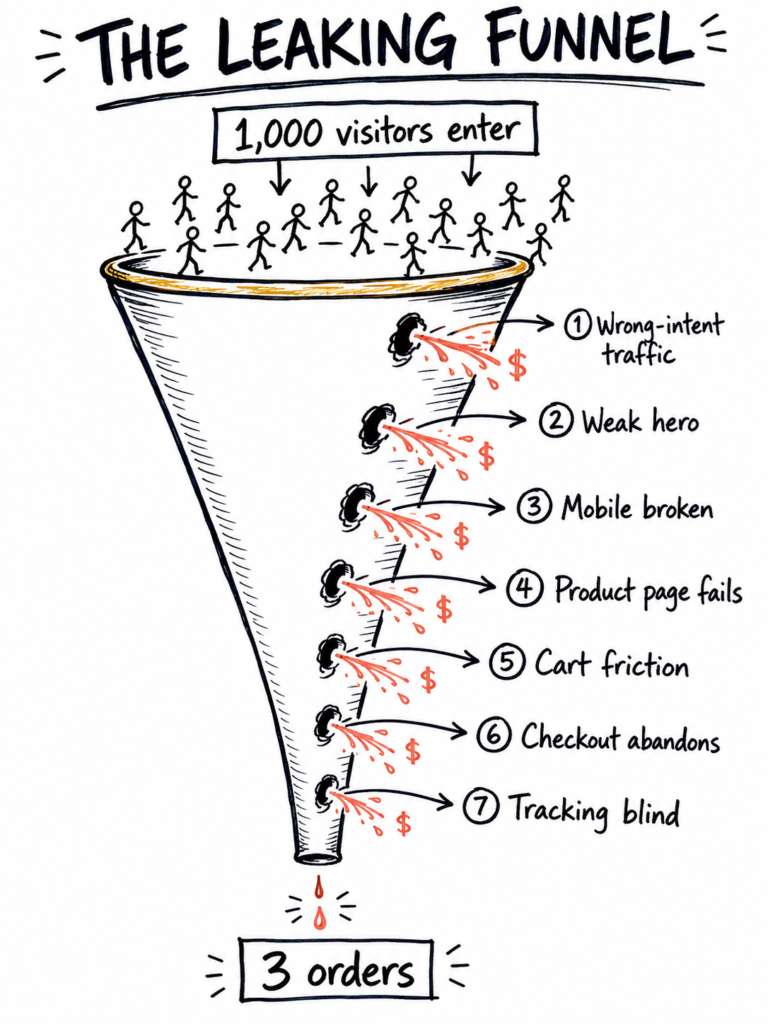
A funnel-by-funnel diagnostic for any Shopify store not converting the traffic it’s already paying for. The four-stage journey every cold visitor needs walked through — and the seven leaks that usually break it.
Open your Shopify analytics. There it is: 1,000 visitors this month. Zero orders. Or three. Or eight, which is somehow worse — because now you can’t tell if those three were signal or noise.
You’re not imagining it, and you’re not alone. We see this pattern on almost every audit we run: a Shopify store with real traffic, real ad spend, real visitors clicking around — and a conversion rate hovering somewhere between zero and “less than my product page deserves.”
Here’s the reframe that matters: if you’ve got 1,000 visitors and no sales, you don’t have a traffic problem. You have a leak problem. The traffic is doing its job. Something between the click and the checkout is quietly throwing those visitors away.
The good news: the leak is almost never in seven different places at once. It’s usually in one — sometimes two. Find the right one and the same traffic, same ads, same products start converting.
This is the walk-through we do on every store audit. Seven places to check, in funnel order, five minutes each. By the time you reach the end, you’ll know which one is costing you the most.
But before we look at the seven leaks, there’s a bigger framework you need to understand — and if you get it wrong, none of the seven fixes will save you.
(For the wider view of why this happens — and why “buy more ads” is the wrong reflex — start with our homepage thesis.)
The Big Idea: cold traffic has to be walked up an awareness ladder, every single time
This is the meta-layer underneath every leak below. Get this wrong and nothing else matters.
When you’re running Meta ads — or any cold-traffic acquisition — the person landing on your page doesn’t know you. They don’t know your product. They often don’t even know they have the problem your product solves. Thirty seconds ago they were scrolling cat videos. Now they’re on your store.
That visitor has to be walked through a four-stage journey, every single time they land. Eugene Schwartz called this the awareness ladder, and it looks like this:
- Unaware — doesn’t know they have a problem.
- Problem-aware — knows something’s wrong, doesn’t know there’s a solution.
- Solution-aware — knows solutions exist, doesn’t know about yours.
- Product-aware — knows about your product, hasn’t bought yet.
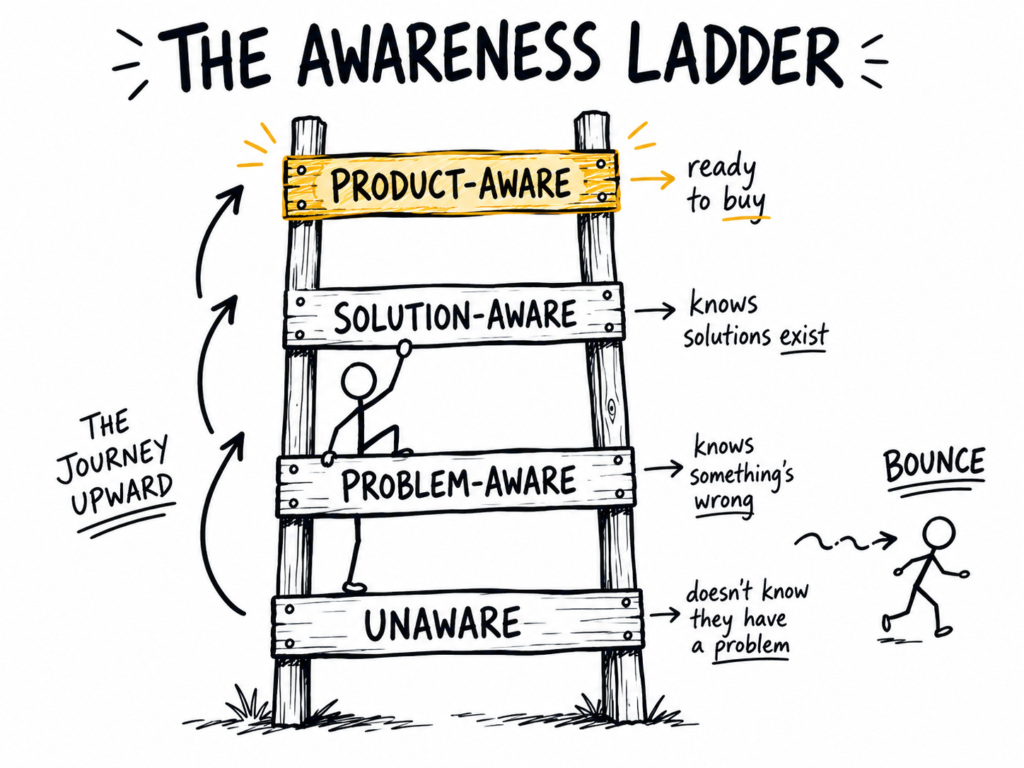
Your landing page (or product page, or homepage when it serves as the ad destination) is not a brochure. It is a conversion funnel inside one page. Its only job is to march the visitor from wherever they arrived all the way up to ready-to-buy. Every word, every image, every section is either pulling them up the ladder — or letting them drift sideways and bounce.
This is the framework. If your page isn’t walking the visitor up the ladder, none of the other six leaks matter. You can have perfect mobile UX, a checkout smoother than Amazon’s, and tracking that’s plumbed perfectly — and you’ll still convert nothing, because the page itself isn’t taking the visitor anywhere.
What this means in practice
Three things change once you accept the ladder is the page’s job:
- Every word has to fight for its place. If a sentence isn’t moving the visitor one rung up the ladder, it’s costing you the sale. Read your page out loud and ask of every line: which stage does this serve? If you can’t answer cleanly, cut it or rewrite it. There is no neutral copy on a conversion page. A sentence that doesn’t move them forward is a sentence pushing them off.
- Every section earns the next scroll. The visitor’s default action is to leave. Each block of the page has to give them a reason to keep going down. If the section after your hero doesn’t deepen the problem awareness they just arrived with, they’re gone.
- You optimise this loop forever. Watch how cold traffic actually responds — heatmaps (Hotjar, Microsoft Clarity), session recordings, scroll depth, micro-conversions. The page is never finished. You’re always finding sentences that aren’t pulling their weight, and replacing them. Good copy is rewritten copy.
This is the single biggest difference between Shopify stores that convert cold traffic and stores that don’t. The losing stores treat their landing pages as product catalogues. The winning ones treat every page as a deliberate, monitored, relentlessly-optimised walk up the awareness ladder — with every word fighting for its place on the page.
Once you have that discipline, the seven leaks below become much easier to find — because you’re reading the page the way the visitor does, asking “is this moving me forward, or letting me drift?” on every line.
Leak #1 — The visitors are wrong. (Check this first, or nothing else matters.)
Before you blame your store, check who’s arriving.
If your 1,000 visitors come from organic social, a viral TikTok, a meme tweet, or a budget Meta campaign optimising for clicks (not purchases), you may have a traffic-intent mismatch. Lots of bodies, wrong bodies. No amount of awareness-ladder work or product-page polish fixes that.
How to check, in five minutes:
- Open GA4 → Reports → Acquisition → Traffic acquisition
- Look at the Session source / medium column
- For each top source, check the engagement rate and conversions
If 700 of your 1,000 visitors came from a single source with a 30-second average session and a bounce rate above 80%, those aren’t shoppers — they’re scrollers. They came for content, not commerce. They won’t make it onto the ladder, let alone climb it.
The fix is harsh but simple: stop paying for the wrong source, and shift to higher-intent acquisition (Meta ads optimised for purchase events, Google search ads on commercial keywords, or branded search). Lower volume, higher conversion, healthier numbers.

Leak #2 — The hero doesn’t earn the scroll.
Once the right person lands, the first three seconds decide everything — because this is where the awareness ladder begins. Your hero is where the visitor steps onto the first rung.
Your hero — the bit above-the-fold on your homepage or landing page — has one job: take the visitor from unaware to problem-aware before they bounce. To do that, it needs to answer three questions, fast:
- Where am I? (Brand clarity.)
- What is this? (Product clarity.)
- Why should I care? (Problem-awareness — naming the pain they didn’t know they had.)
Most underperforming Shopify stores fail on #3. They lead with a generic tagline (“Premium quality, ethically sourced”) that any of their competitors could lift word-for-word. They show a moody stock photo of a woman holding a mug. They don’t give the visitor a single reason to keep scrolling — which means they never made it onto rung two.
The fix: rewrite your hero around your customer’s burning question (the one you found by reading Reddit — see our Meta ads pillar for that whole method). Make the headline a specific outcome, not a vibe. Make the visitor go “oh — that’s me.”
Simple before/after test: rewrite the headline, send 100 visitors to each, check scroll depth. Even a 5% lift here compounds through every leak below.
Show Image
Leak #3 — Your store breaks on mobile. (And 80% of your traffic is mobile.)
Check your traffic device split: GA4 → Reports → Tech → Tech overview.
For most ecommerce stores, mobile is 70-85% of all visitors. And yet most Shopify stores are designed on a 27-inch desktop monitor by the founder, tested on the same monitor, and shipped after a 30-second glance on a phone. Mobile gets treated as a checklist item, not the primary experience.
The test that matters: pick up your phone (your actual phone, not Chrome dev tools), open your store, and try to:
- Add a product to the cart
- Read the full product description without zooming
- Reach the checkout without losing the persistent cart icon
- Get a discount code applied without rage-tappingThey won’t make it onto the ladder, let alone climb it
Where’s the friction? Slow image load? Tiny tap targets? Hero text cut off? A pop-up that won’t close? Each of these costs you 5-15% of mobile conversions, and they compound on top of each other.
A one-second delay in page load costs roughly 7% in conversions. pagespeed.web.dev will tell you exactly where you’re slow and which images are the worst offenders.
Leak #4 — Your product page doesn’t complete the journey.
Most product pages on a Shopify store not converting follow the same skeleton: three product photos, a paragraph of specs, a sizing dropdown, an Add to Cart button.
That’s enough for someone who’s already product-aware — they know your brand, know the product, and arrived ready to buy. It’s nowhere near enough for cold ad traffic, who is almost always still problem-aware or solution-aware and needs the rest of the ladder walked on this page.
A cold-traffic product page has to do the whole journey in one scroll: problem → solution → why your product specifically → why now. Most don’t even try. They drop the visitor straight into “buy this thing” mode and wonder why nobody does.
What’s usually missing on underperforming product pages:
- A problem-restatement near the top — remind them why they’re here and what they were feeling when they clicked
- Real customer photos — not just the polished model shots, the messy real ones
- Reviews visible above the fold — not buried at the bottom of the page where nobody scrolls
- An objection-handling FAQ — “will this fit me?”, “what if I don’t like it?”, “how long does shipping take?”
- A short, scannable value summary — three benefit bullets sitting right next to the buy button
- Trust signals — money-back guarantee badge, secure-checkout marks, a real returns policy linked from the page
A good test: show your product page to someone who’s never seen your brand. Ask them three questions: “Would you buy this? Why or why not? What would make you trust it more?” Their answers are your leak list, written for you in plain English.
Then read your own page out loud and at every section ask: which stage of the ladder is this serving? Anything that doesn’t serve one is cut or rewritten.
Leak #5 — The cart drawer is a friction wall.
The visitor added the product. The cart drawer slides out. Now what?
This is where many stores quietly murder their conversion rate:
- Hidden shipping costs revealed only at checkout is, by Baymard Institute’s repeated data, the single biggest reason customers abandon carts — at around 48% of all abandonments. If shipping is $15 on a $35 product, the visitor mentally re-prices the order, decides it’s too expensive, and closes the tab.
- No clear “next step” CTA in the drawer: visitors don’t know whether to click “View Cart” or “Checkout” or both. The default action becomes “I’ll come back later,” which means never.
- Surprise upsells before checkout that feel pushy, especially on mobile
- Account creation required to continue: a known conversion-killer among first-time buyers
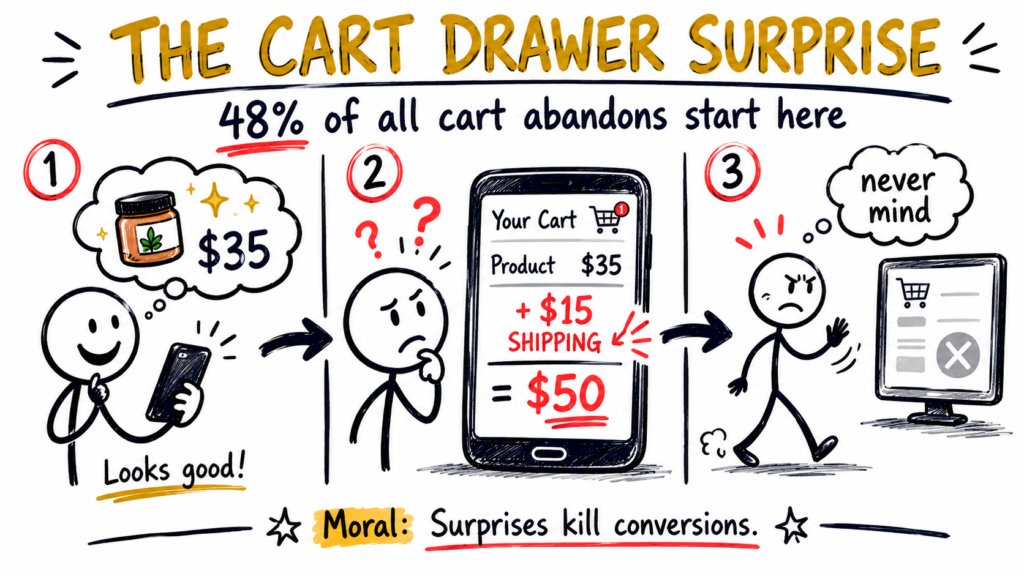
Run the test on your own store right now. Open it on your phone, add a product, watch what happens in the cart drawer. Every extra tap, every surprise, every unclear button is a leak you’re paying ad spend to fill.
The fix: show shipping costs in the cart, not at checkout. One clear “Checkout” button. Guest checkout enabled. No mandatory upsells.
Leak #6 — Your checkout is asking for too much.
A Shopify store not converting at checkout usually has one of three issues:
- Too many fields. Each unnecessary form field drops conversion by roughly 8-10%. Do you actually need their phone number? Their date of birth? A marketing opt-in box pre-ticked by default (which, by the way, isn’t compliant with Australian Privacy Principles)?
- Missing express payment options. Apple Pay, Shop Pay, Google Pay and Afterpay/Klarna together can lift mobile conversion 20-40%. If your checkout still defaults to manual card entry, you’re losing the half-impatient majority who want to tap once and be done.
- Surprise shipping or tax revealed at the final step. Same problem as Leak #5, just moved one step later — and now it stings more because the visitor has already invested time.
Shopify gives you Shop Pay for free. Turn it on. Make it the primary express checkout option above the standard card form. Then audit every form field on the page: if it’s not legally required, get rid of it.
Leak #7 — The phantom leak: your tracking is lying to you.
This one’s the kicker. Sometimes a Shopify store not converting isn’t actually underconverting at all. You’re just not seeing the sales because your tracking is broken.
Common phantom-leak patterns we find on audits:
- GA4 not picking up Shop Pay purchases, a known issue when the Shopify-GA4 integration isn’t configured properly
- Meta Pixel firing twice on Thank You pages, inflating reported conversions in Meta but not in Shopify, so the numbers stop reconciling
- Conversions attributed to “direct” instead of the actual paid channel, because UTM tagging is missing or wrong on your ad URLs
- Shopify reporting in one currency, GA4 in another, making the numbers look like nonsense the moment you start comparing them
How to check, in five minutes:
- Compare Shopify’s Orders count for the last 30 days to GA4’s Purchase event count
- If they’re off by more than 5-10%, your tracking is leaking signal somewhere
- Now add Meta Ads Manager’s “Purchases” for the same period
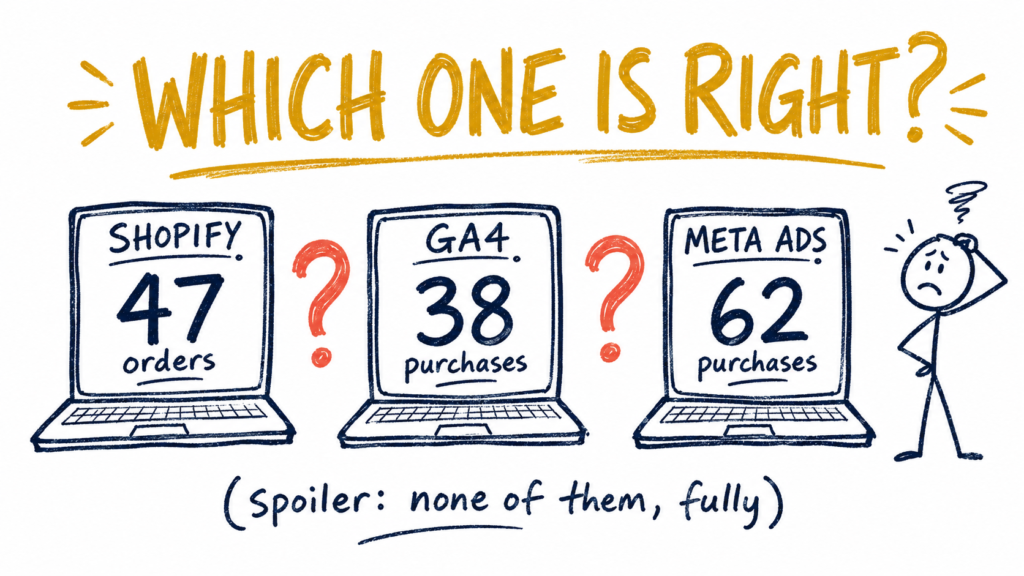
If all three numbers disagree, you don’t actually know what’s working. You can’t fix what you can’t see, and every decision you make from now until you fix the tracking is a guess dressed up as data.
This is one of the most ownable areas in our work — most agencies skip the data layer entirely and just optimise the creative. We don’t. Tracking is where the real leaks hide.
Show Image
Bonus: how to see which sales your Meta ads actually caused
Even when your tracking is working perfectly, there’s a deeper problem: Meta’s default attribution credits itself for a lot of sales that were going to happen anyway. The customer was already going to search for you on Google. The returning customer was going to repurchase regardless. Meta sees a click somewhere in the journey and claims the conversion.
Meta knows this — which is why in 2024 they quietly rolled out a feature called Incremental Attribution inside Ads Manager. It separates the sales the ad genuinely caused (the lift) from the sales Meta is taking credit for that would’ve happened without it.
To turn it on:
- Open Ads Manager and go to your campaign view
- Click the Columns dropdown (top-right of the performance table)
- Select Compare Attribution Settings
- Scroll down and click Advanced Options
- Tick the Incremental Attribution box and click Apply
Your reported numbers will get worse. Conversions will drop. ROAS will look lower. That’s the point — those are the real numbers. Everything above that was Meta giving itself credit for things it didn’t cause.
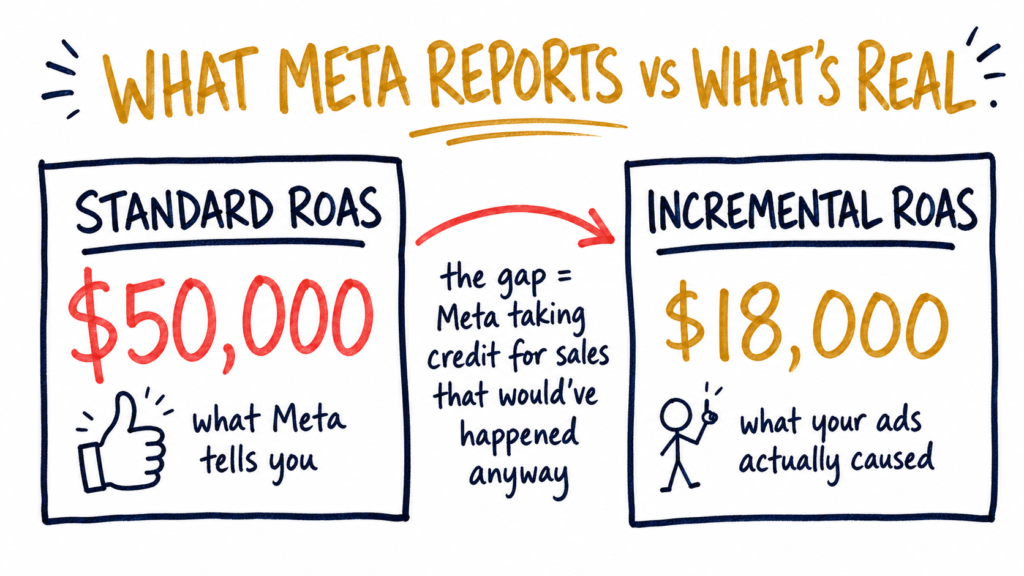
A useful pattern to watch for: high standard ROAS + low incremental ROAS means your campaign is largely taking credit for sales that would have happened anyway. High standard ROAS + high incremental ROAS means the campaign is actually driving new revenue. The gap between the two numbers tells you how much of your “Meta ad spend ROI” is real.
Two caveats: incremental attribution isn’t available to all accounts yet — Meta rolled it out gradually through 2024 and 2025, and access depends on account eligibility plus minimum volume requirements. If you don’t see the option in your Columns menu, your account doesn’t have access yet. Also: retargeting campaigns will look terrible on incremental, because retargeting reaches people already near the bottom of the funnel who’d often convert anyway. Prospecting campaigns are where incremental shines.
This is the single most honest number you can get inside Meta. Most agencies will never show it to you — because it makes their own reports look worse.
Why a Shopify store not converting usually has just one real leak
If you’ve walked the funnel and ticked through these, you’ve probably noticed something: the leak is rarely in seven places at once. It’s almost always in one — sometimes two — and they’re usually right next to each other in the funnel.
The most common patterns from our audits:
- Leak #2 (hero doesn’t earn the scroll) and Leak #4 (product page doesn’t complete the journey) together account for maybe 60% of “good traffic, no sales” cases. Both are messaging problems pretending to be design problems — and both, underneath, are awareness-ladder problems. The page isn’t walking the visitor up the rungs.
- Leaks #5 and #6 (cart and checkout friction) are the next most common — especially on mobile, where every extra tap costs you.
- Leak #7 (broken tracking) is the silent one. It doesn’t change your real conversion rate, but it makes every other leak impossible to diagnose because you can’t trust the numbers you’re looking at.
Underneath all seven sits the same single question: is your page walking cold traffic from unaware to product-aware, or letting them drift sideways and bounce? That’s the meta-leak. Fix that, and the seven below get much easier to find — and much easier to fix.
Want us to find the leak in your Shopify store?
If your store is getting traffic but not converting, you’ve already done the hardest part — you’ve got visitors. The bottleneck is somewhere between the visitor’s first scroll and the checkout button, and we’d rather show you exactly where than have you guess for another month of wasted ad spend.
Book a free 20-minute revenue audit. We’ll open your store live, walk the awareness ladder together, and tell you which of the seven leaks is costing you the most right now — and whether your page is even moving cold traffic up the rungs in the first place.
cortex.labs — turning the traffic you already have into more sales.
The honest answer: there’s usually one leak in your funnel that’s bigger than the others, not seven small ones. In our audits, the most common culprits are messaging mismatch on the hero or product page (you’re not answering your visitor’s burning question), mobile UX friction (where 80% of your traffic sits), and broken tracking that’s hiding sales you’re actually making. Walk the seven-leak diagnostic above to find yours specifically.
For most ecommerce stores, 2-3% is roughly the industry average, and the top 10% sit at 4-5%+. So if you’re under 1%, you’ve almost certainly got one of the seven leaks above — usually messaging on the hero or product page. Below 0.5%, either your traffic is wrong-intent (Leak #1) or your tracking is broken (Leak #7) and the real number is hidden from you.
Two leaks usually cause this. First, hidden shipping costs revealed only at checkout (Leak #5) — Baymard’s research puts this at 48% of all cart abandons. Second, friction at checkout itself (Leak #6) — too many form fields, no Shop Pay, surprise tax at the final step. Watch your own checkout on mobile. Every extra tap is a place where visitors leave.
Always the store first. If your store doesn’t convert at a decent rate with your current traffic, spending more on ads just multiplies the leak — you’re paying more to lose more. So fix the conversion funnel first, then scale the ad spend. The math is unforgiving in the other direction.
Quick five-minute test: pull your last 30 days of orders from Shopify, then compare to GA4’s Purchase events and Meta Ads Manager’s Purchases. If the three numbers disagree by more than 5-10%, your tracking is leaking signal. Often what looks like a Shopify store not converting is actually a Shopify store with broken reporting — and you can’t trust any other decision until you fix it. See Leak #7 above for the full breakdown.
For most of the seven leaks above — no. Hero copy, product page structure, cart-drawer fixes, checkout field cleanup, and Shop Pay activation are all things you can do directly in the Shopify admin without touching code. Only the tracking fixes (Leak #7) and complex theme customisation typically need a developer. Most of the conversion lift we find in an audit of a Shopify store not converting comes from copy and structure changes, not code.
If your store is getting traffic but not converting, you’ve already done the hardest part — you’ve got visitors. The bottleneck is somewhere between the visitor’s first scroll and the checkout button, and we’d rather show you exactly where than have you guess for another month of wasted ad spend.
Book a free 20-minute revenue audit. We’ll open your store live, walk the awareness ladder together, and tell you which of the seven leaks is costing you the most right now — and whether your page is even moving cold traffic up the rungs in the first place.
Book a free 20-minute audit →